Moving the pen carriage
There is nothing to stop you
The terraPen has no travel limits
There are no soft limits and no hard limits set. The limit switches are used for homing only — they do not stop the carriage during ordinary moves.
If you keep jogging past the end of the travel, the machine will drive into its own frame and keep pushing. Nothing intervenes.
Use the large steps to cross the bed, and switch to small steps as you approach the edges. If you are not sure where the carriage is, home it first.
In terraForge
The jog panel in terraForge is the normal way to move the machine.
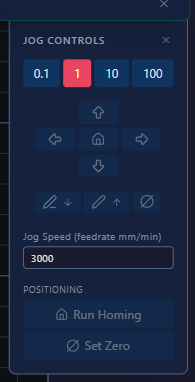
It holds everything you need in one place:
- Step size — 0.1, 1, 10 or 100 mm per click
- Direction arrows for X and Y, with the house icon returning to origin
- Pen up and pen down — the pencil icons
- Jog speed in mm/min
- Run Homing — runs the homing cycle
- Set Zero — sets the current position as your job origin
By hand
Only with the machine powered off. Push the carriage gently, and never force it against the ends of its travel.
In the web UI
The jog wheel in the Controls panel moves the carriage. Click a segment to move in that direction; the distance depends on which ring you click:
| Ring | Distance per click |
|---|---|
| Outer | 100 mm |
| Second | 10 mm |
| Third | 1 mm |
| Inner | 0.1 mm |
Start with a large step to get close, then work inwards for fine positioning.
The Z axis
The stepper toolhead has roughly 14 mm of Z travel. In normal use you only need about 5 mm of it — see setting the pen height.
On an earlier machine with a solenoid pen lift, the pen is driven up and down by the solenoid rather than a stepper.
Mind the bed
Z zero is wherever you last set it, normally with the nib on the paper. Jogging down from there drives the nib into the bed. Use pen up and pen down rather than jogging Z once your height is set.